<div align="center">
<img src="https://raw.githubusercontent.com/Rebreda/listenr/main/assets/images/logo.png" alt="Listenr Logo" width="64">
Listenr
사용자의 장치에서 완벽하게 작동하는 더 나은 Speech-to-Text 및 ASR 모델 구축.
목소리를 녹음하세요. 로컬 AI로 정리합니다. Whisper나 Moonshine을 파인튜닝(Fine-tune)하세요. 진정으로 자신만의 것을 배포하세요.
PyPI
Python
License
Tests
<a href="https://quickthoughts.ca/posts/listenr-asr-training-data-problem/">워크스루(Walkthrough)</a> |
<a href="https://github.com/Rebreda/listenr/blob/main/docs/setup.md">설정(Setup)</a> |
<a href="https://github.com/Rebreda/listenr/blob/main/docs/configuration.md">구성(Configuration)</a> |
<a href="https://github.com/Rebreda/listenr/blob/main/docs/recording.md">녹음(Recording)</a> |
<a href="https://github.com/Rebreda/listenr/blob/main/docs/dataset.md">데이터셋(Dataset)</a> |
<a href="https://github.com/Rebreda/listenr/blob/main/docs/troubleshooting.md">문제 해결(Troubleshooting)</a>
<a href="https://lemonade-server.ai" target="_blank" rel="noopener">
<img
src="https://raw.githubusercontent.com/lemonade-sdk/assets/main/challenge/
[email protected]"
alt="Lemonade Developer Challenge Winner"
width="200"
height="44"
>
</a>
</div>
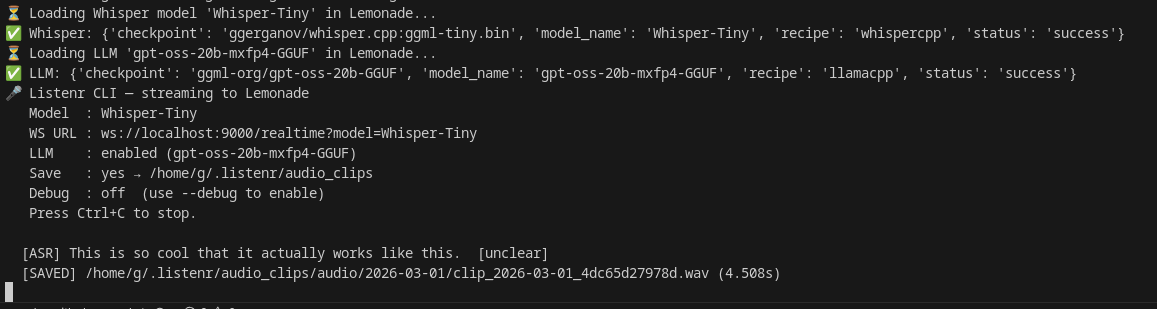
Listenr CLI streaming - example output
작동 방식
- 양질의 데이터 생성: Listenr를 사용하여 범용 모델이 놓치는 도메인 특화 어휘가 포함된 자연스러운 음성을 녹음하고 수집합니다.
- 처리 및 개선: 이를 Lemonade 또는 모든 OpenAI 호환 제공업체를 통해 파이프라인 처리하여 Whisper로 전사(transcribe)하고 로컬 LLM을 사용하여 문법, 구두점, 동음이의어를 자동으로 교정합니다.
- 파인튜닝 및 배포: Listenr를 사용하여 학습(train)/개발(dev)/테스트(test) 분할을 구성하고, LoRA를 사용하여 Whisper 또는 Moonshine을 파인튜닝합니다. 어댑터를 자체 포함 모델로 병합하여 배포할 수 있습니다.
모든 것이 로컬에 유지됩니다. 오디오, 텍스트 또는 가중치(weights)는 절대 사용자의 장치를 벗어나지 않습니다.
시작하기
Lemonade 설치 및 모델 가져오기:
Lemonade 가이드: lemonade-server.ai/docs/guide/install
lemonade pull Whisper-Base
lemonade pull gpt-oss-20b-mxfp4-GGUF
Listenr 설치 및 녹음 시작:
uv tool install listenr
listenr record
PyPI에서 사용 가능합니다. Python 3.11 이상 버전이 필요합니다. 기본 설치는 녹음, 전사 및 데이터셋 구축을 다루며, 파인튜닝과 데이터셋 가져오기(dataset importers) 기능은 [docs/setup.md]에 나열된 extras를 통해 활성화됩니다.
AMD GPU의 경우, finetune extras를 설치하기 전에 ROCm torch를 설치해야 합니다. 그렇지 않으면 pip가 사용자의 카드를 인식하지 못하는 CUDA 휠을 해결할 수 있습니다. 자세한 내용은 [docs/setup.md]를 참조하십시오.
Listenr 자체를 개발 중이라면, 레포지토리를 클론하고 대신 uv pip install -e ".[dev]"를 사용하십시오.
녹음이 완료되면 처리 및 파인튜닝 수행:
listenr build-dataset --format hf
...
전체 설치 세부 정보는 [docs/setup.md]를 참조하십시오.
외부 ASR 데이터셋을 혼합하려면, 선택적 임포터(optional importers)를 사용하여 별도의 Listenr 호환 매니페스트를 작성하세요: listenr import-mdc <dataset-id> (Mozilla Data Collective) 또는 listenr import-hf <dataset-id> (Hugging Face). 그런 다음 이 매니페스트를 일반 매니페스트와 함께 listenr build-dataset에 전달합니다. 자세한 내용은 docs/dataset.md를 참조하세요.
내부 작동 원리 (Under the hood)
녹음 및 전사(Recording & transcription) - Listenr는 마이크를 Lemonade의 /realtime WebSocket으로 약 85ms 청크(16 kHz) 단위로 스트리밍합니다. Lemonade의 음성 활동 감지(Voice Activity Detection, VAD) 기능이 음성을 분할하고, Whisper.cpp를 실행하며, 전사본을 다시 스트리밍합니다.
자동 교정(Auto-correction) - 로컬 LLM이 구두점, 문법 및 동음이의어를 정리하여, 순수한 Whisper 출력만으로는 얻기 어려운 고품질 학습 코퍼스(training corpus)를 생성합니다.
데이터셋 및 파인튜닝(Dataset & fine-tuning) - Listenr는 각 발화(utterance)를 .wav 클립과 manifest.jsonl의 한 줄로 저장합니다. 하나의 명령으로 HuggingFace 형식의 train/dev/test 분할을 생성하고, 다른 명령으로는 LoRA를 사용하여 모든 openai/whisper-* 또는 UsefulSensors/moonshine-* 모델을 파인튜닝합니다 (Podman을 통해 AMD 및 NVIDIA GPU에서 작동). Moonshine은 체크포인트당 하나의 언어를 가진 작고 엣지 지향적인 옵션(English, 또는 moonshine-ai/*-<lang> 변형)이며 새로운 언어에 맞춰 파인튜닝할 수 있고, Whisper는 다국어 범용 모델입니다.
배포(Deployment) - listenr merge는 LoRA 어댑터를 순수 transformers로 로드되는 독립적인 모델에 통합합니다. PEFT 의존성이 없습니다. 로컬에서 추론(inference)을 실행하거나 어디든 배포할 수 있습니다.
명령어 (Commands)
| Command | What it does | Needs |
|---|
listenr record | 마이크로 녹음 및 실시간 전사 기능 제공 | core |
| ... | | |
추가 기능은 uv pip install "listenr[finetune]"으로 설치합니다. 해당 추가 기능을 사용하지 않는 명령을 실행하면 필요한 설치 라인이 출력됩니다. | | |
문서화 (Documentation)
| 가이드 | 설명 |
|---|
| docs/setup.md | 설치(Installation), Lemonade Server, 마이크 설정 (microphone setup) |
감사의 글 (Acknowledgments)
라이선스 (License)
Mozilla Public License Version 2.0 - LICENSE 참조.