2026년 7월 13일 - Link Blog
DOOMQL (via) Peter Gostev가 GPT-5.6 Sol을 사용하여 제작했습니다. 이것은 정말 재미있습니다:
DOOMQL은 의도적으로 비합리적인 질문에서 시작되었습니다: 만약 SQLite가 단순히 게임 데이터를 저장하는 장소가 아니라, 게임 엔진 그 자체라면 어떻게 될까?
그 결과, SQL이 이동, 충돌, 적, 전투, 진행 상황 및 화면의 모든 RGB 픽셀을 제어하는 작고 독창적인 Doom 스타일의 게임이 탄생했습니다.
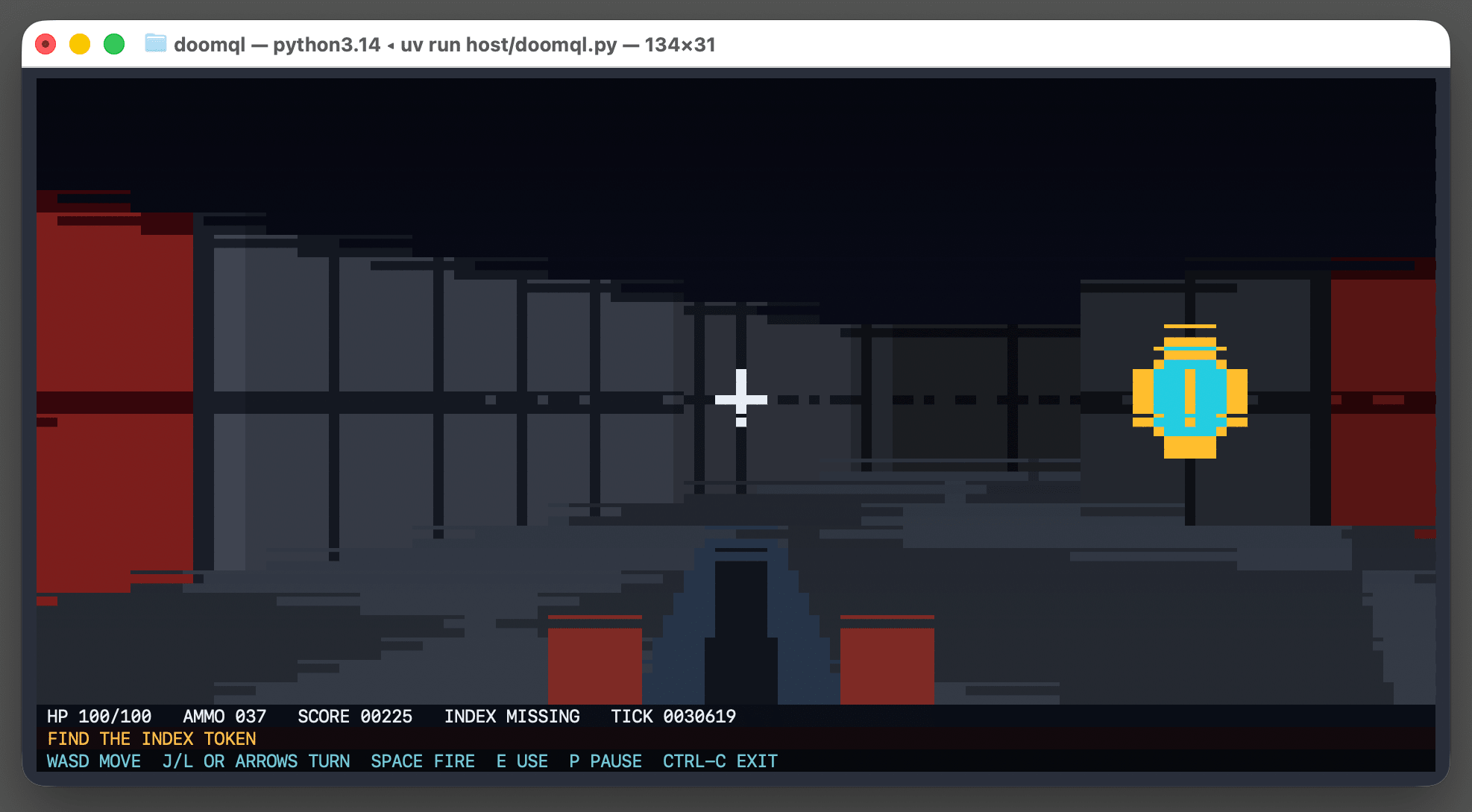
이것은 Python 터미널 스크립트로 구현되었습니다 - 저는 다음과 같이 테스트해 보았습니다:
cd /tmp
git clone https://github.com/petergpt/doomql
cd doomql
...
Screenshot of a macOS terminal window titled "doomql — python3.14 ◂ uv run host/doomql.py — 134×31" showing a retro Doom-style game rendered as text-mode pixel art. The scene is a pixelated first-person corridor with gray paneled walls, dark red doors on the far left and right, a floating cyan-and-gold coin pickup on the right side, a white crosshair near the center, and a dark weapon barrel rising from the bottom center. A status bar below the scene reads "HP 100/100 AMMO 037 SCORE 00225 INDEX MISSING TICK 0028450", followed by an orange line "FIND THE INDEX TOKEN" and a cyan controls line "WASD MOVE J/L OR ARROWS TURN SPACE FIRE E USE P PAUSE CTRL-C EXIT".
다음은 재귀적 CTE (Recursive CTE)를 사용하여 SQLite 내에서 완전한 레이 트레이서 (Ray Tracer)를 구현하는 거대한 SQL 쿼리입니다.
위의 스크립트를 실행하면 /tmp/doomql/.doomql/doomql.sqlite 파일이 생성됩니다.
이 SQLite 데이터베이스는 다음과 같이 Datasette을 사용하여 탐색할 수 있습니다:
uvx --prerelease=allow --with datasette-apps datasette \
/tmp/doomql/.doomql/doomql.sqlite \
-p 4444 --root --secret 1 --internal internal.db
--with datasette-apps 옵션은 새로운 Datasette Apps 플러그인을 설치하며, 이 플러그인은 Datasette 인터페이스 내에서 SQL 쿼리를 직접 실행할 수 있는 커스텀 HTML+JavaScript 앱을 생성하는 것을 지원합니다.
저는 새로운 앱을 만들고, 복사-붙여넣기용 프롬프트를 Claude chat (Fable 5)에 붙여넣은 뒤 다음과 같이 명령했습니다:
x, y, r, g, b 컬럼을 가진 frame_pixels 뷰를 사용하여 현재 화면 상태를 표시하는 앱을 만들어줘. 1초에 한 번씩 새로고침되도록 해.
이를 통해 제가 터미널에서 게임을 플레이하는 동안 현재 상태를 반영할 수 있는, Datasette 내부의 작동하는 HTML+JavaScript 앱을 얻을 수 있었습니다. 그 다음 저는 다음과 같이 추가했습니다:
미니맵을 추가해줘
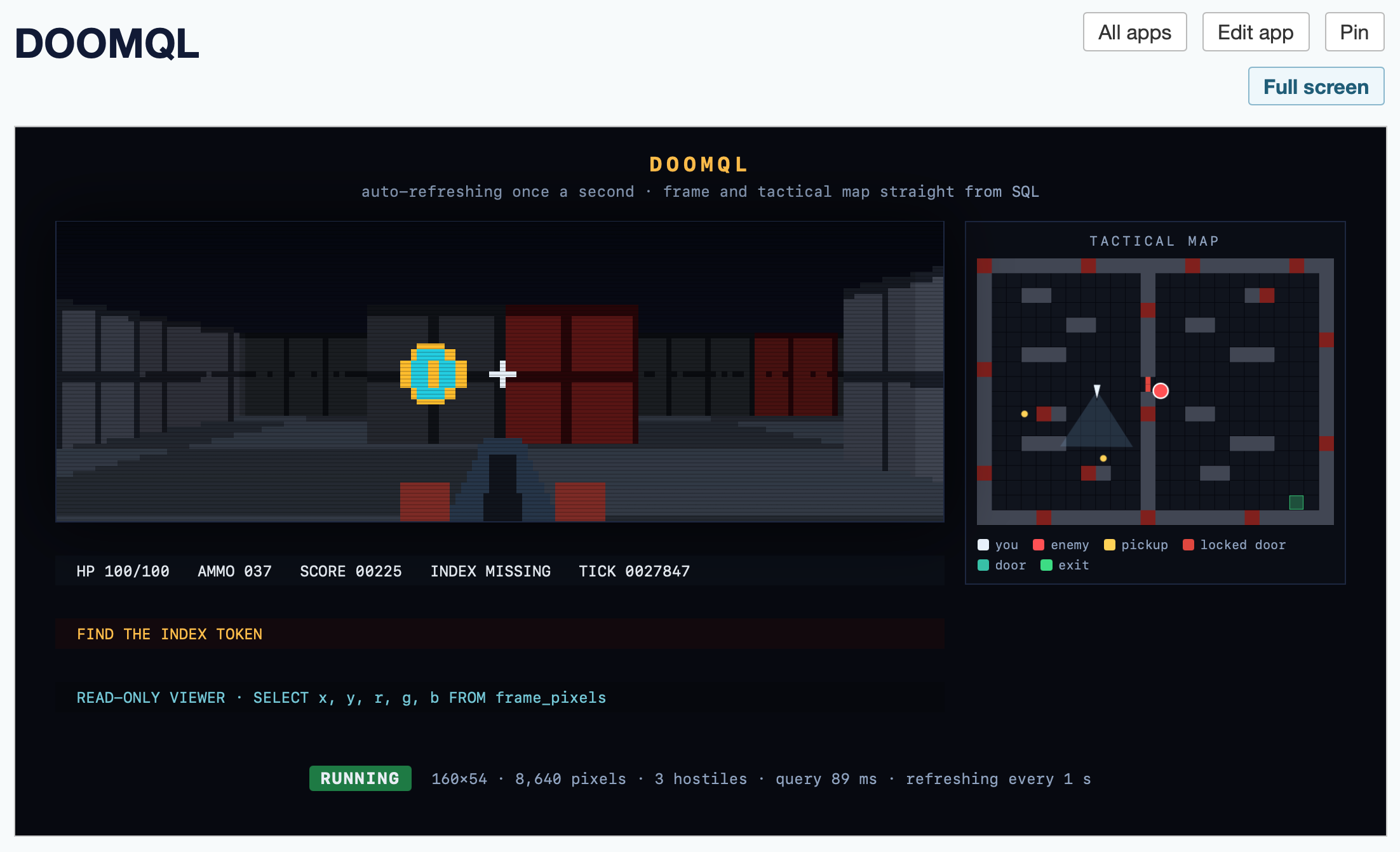
이제 제 Datasette App은 다음과 같이 보입니다:
Screenshot of a dark-themed web app running a retro Doom-style game rendered from SQL queries. The page header reads "DOOMQL" with buttons "All apps", "Edit app", "Pin", and "Full screen". Inside the game panel, the title "DOOMQL" sits above the subtitle "auto-refreshing once a second · frame and tactical map straight from SQL". The left side shows a pixelated first-person corridor view with gray walls, dark red doors, a floating cyan-and-gold coin pickup, a white crosshair, and a weapon barrel at bottom center. A status bar below reads "HP 100/100 AMMO 037 SCORE 00225 INDEX MISSING TICK 0027847". On the right, a panel titled "TACTICAL MAP" shows a top-down grid map with a player triangle, a red enemy circle, yellow pickup dots, red wall markers, and a green exit square, with a legend reading "you", "enemy", "pickup", "locked door", "door", "exit". Below the game view, an orange banner reads "FIND THE INDEX TOKEN", followed by the cyan line "READ-ONLY VIEWER · SELECT x, y, r, g, b FROM frame_pixels". At the bottom, a green "RUNNING" badge appears beside the stats "160×54 · 8,640 pixels · 3 hostiles · query 89 ms · refreshing every 1 s".
다음은 HTML 앱 코드입니다 - 직접 시도해 보려면 (위에서 언급한 uvx --with datasette-apps 레시피를 사용하여) 본인의 Datasette 인스턴스에 붙여넣으세요.
최근 기사
- 새로운 GPT-5.6 제품군: Luna, Terra, Sol - 2026년 7월 9일
- sqlite-utils 4.0, 이제 데이터베이스 스키마 마이그레이션 지원 - 2026년 7월 7일
- sqlite-utils 4.0rc2, 대부분 Claude Fable이 작성 (약 $149.25 소요) - 2026년 7월 5일